LiveCaptionN: live captions and translation over any Android app
LiveCaptionN floats real-time captions and translation over any app, offline on your phone or through your own Whisper server.
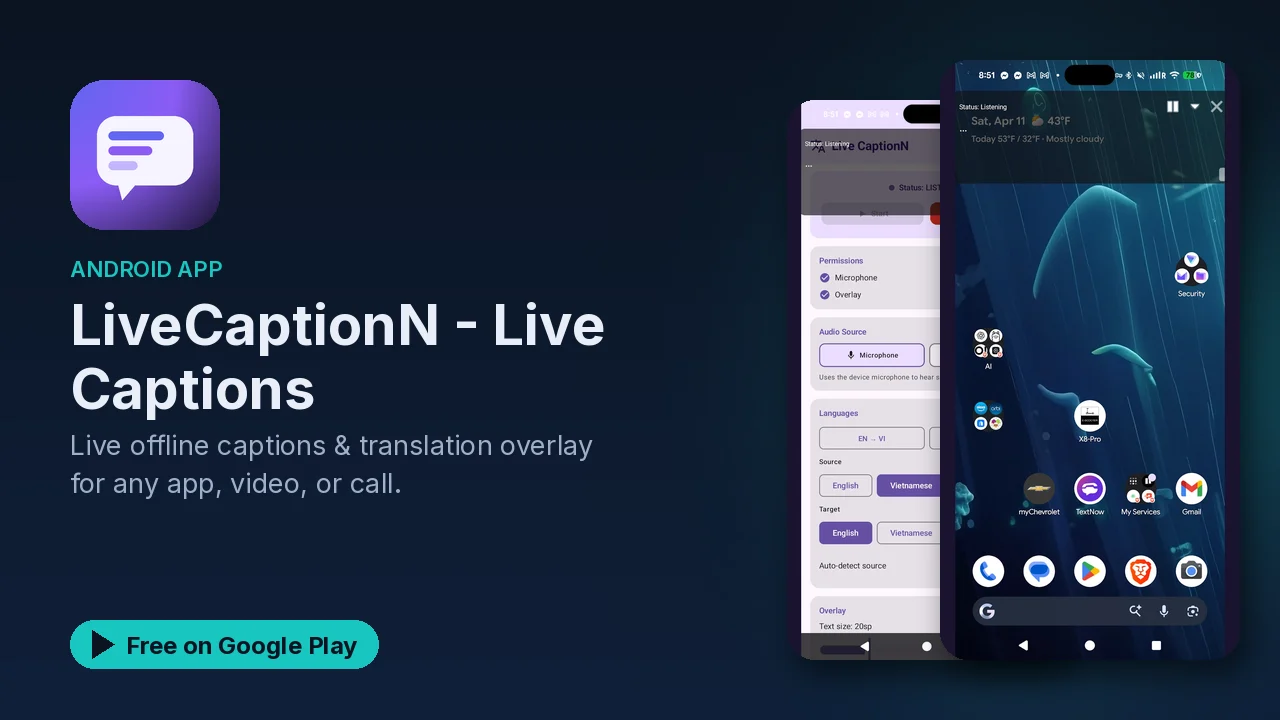
Captions help in more situations than people expect. A video in another language, a noisy room, a call where the audio keeps dropping, a lecture you want to review later, or simply hearing difficulties. LiveCaptionN puts real-time captions in a floating window over whatever app you are using, and it can translate them as they appear.
What makes it interesting for a homelab audience is that it gives you two ways to process speech: fully on the phone, or on a server you run yourself.
What it does
- Floating overlay. A resizable, draggable caption window sits over any app. You can pause, minimize or restyle it.
- Two audio sources. Capture from the microphone, or capture internal system audio directly on Android 10 and later.
- Streaming transcription. Low-latency speech-to-text from the streaming Vosk engine.
- Live translation into 59+ languages using Google ML Kit or a self-hosted LibreTranslate instance.
- Transcript history. Search, review and export timestamped caption logs.
- Customization. Font size, text color, background opacity and position.
- Localized interface in 59 languages.
Two processing modes
On-device
Everything runs on the phone, without internet access. You download a Vosk speech model and the ML Kit language packs you want, and after that your audio and captions never leave the device. There is no account sign-up and no tracking.
Self-hosted
You run OpenAI Whisper ASR and LibreTranslate on your own computer or home server, which the listing describes as Docker-ready. You start the container on the PC or server, then enter its local network address in the app settings. The listing's example is a LAN address such as 192.168.1.50 on port 9000.
The trade is clear. The heavy processing moves from the phone to your machine, which saves battery and CPU on the phone and gives you Whisper's accuracy. The app includes an interactive tutorial for this mode with video and audio guidance.
Hardware check
The app checks your hardware at startup and recommends a mode.
| Mode | Minimum | Recommended |
|---|---|---|
| On-device | 2.5 GB RAM, 4 CPU cores, 350 MB free storage | 4 GB+ RAM, 64-bit multi-core CPU, 1.5 GB free for large models |
| Self-hosted | 1.5 GB RAM, Android 9.0 (API 28), on your home Wi-Fi or LAN |
Devices under 2.5 GB of RAM or 4 cores are routed to self-hosted mode automatically, and devices with 2.5 to 3.8 GB get performance recommendations and lighter models. Self-hosted mode is how an older or budget phone can still get good captions.
Privacy and permissions
The listing states that audio streams and transcripts never leave your device or your local network. The permissions it asks for:
- Microphone, to capture live speech.
- Display over other apps, for the floating captions.
- Foreground service, to keep captions running while you multitask.
- System audio (optional, Android 10+), to caption what other apps are playing.
Good to know
- Core features are free: unlimited captions from mic and internal audio, on-device Vosk, ML Kit translation, the floating window, history export and self-hosted mode.
- Ads: the free version shows banner and interstitial ads.
- Ad-Free ($1.99/mo per the listing): removes all ads.
- Pro ($4.99/mo per the listing): ad-free, plus higher-accuracy Vosk models, premium overlay themes, custom vocabulary and glossary replacements, and extended offline language packs.
Is it for you?
- You want captions on videos, calls or podcasts in any app.
- You need hearing accessibility support that works offline.
- You are learning a language and want live translation as people speak.
- You already run Docker at home and want Whisper-quality captions on your phone.